

Published on 21 Aug 2026
How to Record Assessable Government Industry Payments in Your Accounting Software starts with confirming why the payment was made, whether it is assessable income, and whether Goods and Services Tax (GST) applies. Coding a deposit straight to sales can overstate business income, place GST in the wrong part of your Business Activity Statement (BAS) or hide a payment that needs separate review.
Classify the Payment Before Coding It
Start with the funding agreement, approval letter and remittance advice. Identify whether the payment supports everyday business activities, pays for goods or services, reimburses an expense, or helps the business acquire income producing assets. The purpose of the payment matters more than the description shown in the bank feed. Most assessable government industry assistance connected with carrying on an existing business is assessable income and may be recorded as other business income. Some government grants are exempt income or Non-Assessable Non-Exempt (NANE) income under specific rules, while funding that remains repayable may be recorded in a liability or clearing account until your accountant confirms when it can be recognised.
Are your government payments coded correctly for BAS?
Schedule a complimentary consultation with us today to apply the right GST and BAS code.
Income Tax and GST Need Separate Decisions
A payment can form part of the business’s assessable income for income tax purposes without being subject to GST. When a grant is paid only because your business meets eligibility conditions and you do not provide anything in return, there is generally no taxable supply. When your business provides goods or services or enters a binding obligation in return for the payment, GST may apply if the other requirements for a taxable supply are met. Do not choose a GST-free sales code simply because no GST applies. GST-free sales are reported at G1 on the BAS, while a government payment that is not consideration for a supply may need a BAS-excluded or not-reportable software code, depending on your accounting software. The grant itself does not create input tax credit entitlements, although eligible purchases funded by the grant may create GST credits under the usual rules.
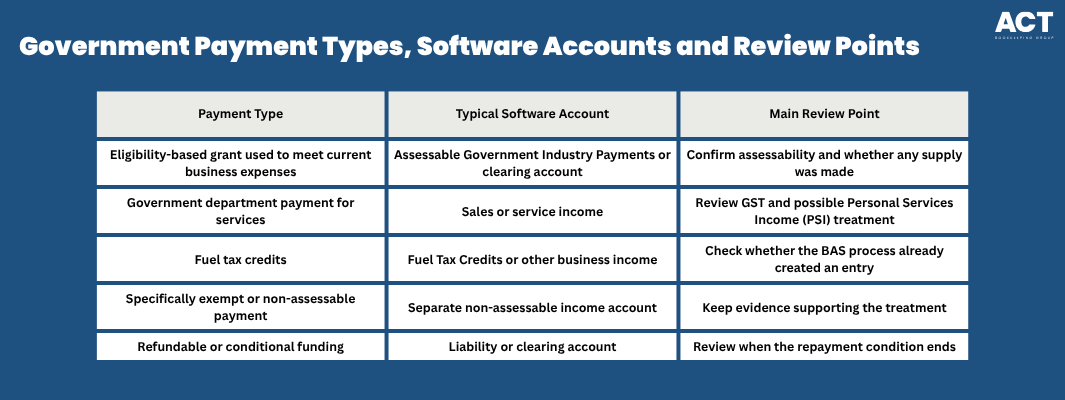
Example: A Canberra cleaning business receives a $10,000 government grant after meeting location and turnover conditions. It does not provide goods or services in return, so the business records the payment in its dedicated government income account using the confirmed BAS-excluded code, then asks its tax adviser to confirm the income tax treatment. Example: A contractor receives $11,000 from a government department for completed services. If the payment is for a taxable supply, the accounting entry records $10,000 as service income and $1,000 as GST, while the contractor’s accountant considers whether PSI rules also apply.
Set Up Clear Accounts in Your Software
Create a separate account called Assessable Government Industry Payments within other income or other business income. Record the income component separately from the related business expenses, with any GST component posted to the correct GST account. This keeps gross income, expenses and net income visible on the profit and loss statement. Use a tracking category for the program, project or funding round so you can compare approved funding with the amount received and spent. Do not mix government industry payments with loans, owner contributions, rental income, sales or personal transfers. A separate structure also helps your accountant identify assessable income without reviewing every bank transaction.
Even when funding is used to finance business operations, record the income and expenses separately. Do not reduce the grant account by motor vehicle expenses, lease expenses, interest paid, trading stock, superannuation expenses or other current business expenses.

Record and Reconcile Each Payment Consistently
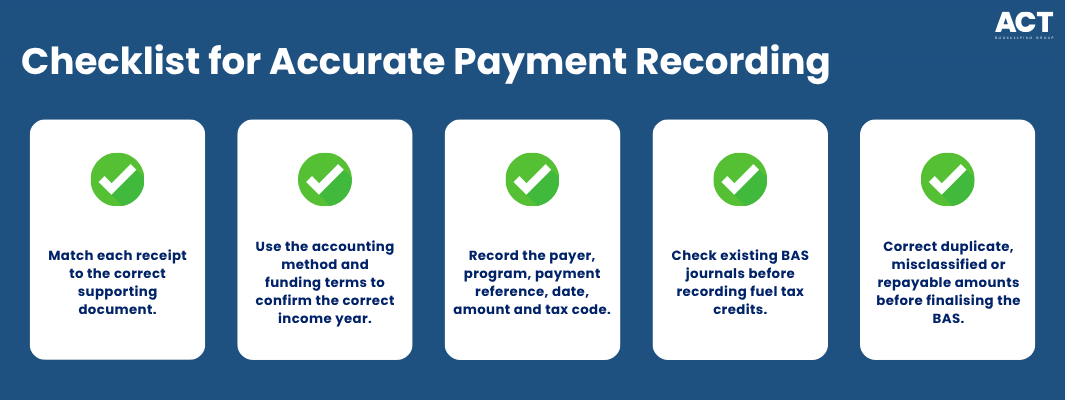
Match each bank receipt to the supporting document. Use your business’s cash or accrual accounting method and the funding terms to determine the correct income year for tax purposes, then record the government agency, program name, payment reference, date, amount and confirmed tax code. Record monthly payments separately so the ledger agrees with the remittance history. If the business receives cash payments, cheques or direct deposits under a program, record the payment method clearly before reconciling it to the bank or cash account. Attach the agreement, approval letter, remittance advice and any calculation used to divide income and GST. This creates a clear record for the BAS, tax return and any later review.
Example: An arborist claims $2,400 in fuel tax credits through the BAS. Depending on how the BAS is processed, the credit may reduce the BAS payable or contribute to a refund. Check whether your accounting software has already created the BAS journal before recording the transaction, so the amount is recognised only once.
Asset-Related Payments and Reconciliation Adjustments Need Care
A payment used to acquire income producing assets should not be netted automatically against the purchase price or coded as normal sales. Record the receipt separately and record the purchase as capital expenditure or a depreciating asset, following the treatment confirmed by your accountant. Capital expenditure incurred is not automatically tax deductible in full when the business pays for the asset. A depreciating asset may be eligible for decline in value deductions, although specific concessions may apply to certain capital expenditure. Government payments connected with assets, business rights or disposals can also affect future income tax calculations, including Capital Gains Tax (CGT), so these transactions should be reviewed before the income tax return is prepared.
Example: A café receives a $20,000 grant to purchase commercial refrigeration equipment. The business records the government payment separately and records the equipment as an asset rather than an everyday expense. Its accountant then confirms the payment’s assessability and the available decline in value deduction. Expense reconciliation adjustments may be needed when the expenses shown in the accounts differ from the amounts allowed for tax purposes. Common areas include:
Depreciation expenses and tax decline in value
Interest expenses with private or non-business components
Motor vehicle expenses with mixed business and personal use
Trading stock adjustments
Lease expenses paid in advance
Certain capital expenditure
Expenses incurred but not yet deductible
We’re more than bookkeeping experts
As part of ACT Tax Group, we offer complete accounting and business advisory services tailored to your needs.
Taxable Payments Reporting Supports the Final Review
Under the taxable payments reporting system, certain government entities report eligible payments and grants through a Taxable Payments Annual Report (TPAR). TPAR information is a useful cross-check, but it may not include every amount that belongs in your tax return. The funding terms and the tax law determine whether a payment is assessable income, exempt income, non-assessable non-exempt (NANE) income, subject to GST or has Capital Gains Tax (CGT) consequences. Match the payer’s name, Australian Business Number (ABN), gross amount, GST amount, payment date and description to your accounting records. Differences can arise because of payment timing, GST-inclusive figures or amounts reported in a different financial year. Investigate any difference rather than changing the ledger only to match reported information.
The Australian Taxation Office (ATO) generally requires businesses to keep most tax and business records for five years. Store the documents with the software transaction so the original decision can be understood later.
How ACT Bookkeeping Can Help with Government Payment Records
We can set up clear income and clearing accounts, apply confirmed Goods and Services Tax (GST) codes, attach supporting documents, and reconcile government payments to your bank and Business Activity Statement (BAS) reports. We can also organise entries for your accountant to review, including whether an expense relates to producing assessable income. We can also identify records that have been labelled as “assessable non exempt income” so your accountant can determine whether the correct ATO category is assessable income, exempt income or non-assessable non-exempt (NANE) income. We also keep records separate where a calculation specifically requires excluding capital gains. Where they apply to your business, we can keep clear records for:
Interest expenses overseas or connected with overseas borrowing
Retainer agency fees
Debt deductions
Foreign resident withholding
Wine equalisation tax
Payments involving a retirement savings account
An unusual arrangement such as a debt for equity swap
Book a consultation with ACT Bookkeeping to arrange a practical review of your accounting software and government payment records. We use these categories only when they apply and keep the supporting documents organised so your accountant can confirm the final treatment before you pay tax. For a small business entity, this can reduce the risk that you pay additional tax because income, expenses or deductions were missed or recorded incorrectly.

Keep Government Payment Records Clear and Complete
Accurate recording starts with understanding why the government payment was made. Classify the payment, review income tax and GST separately, use a dedicated account, attach the supporting documents and complete regular reconciliations. Review any government deposits currently recorded as sales, loans, uncategorised income or negative expenses. Correcting the accounts before your next BAS or income tax return gives your adviser clearer information and reduces the chance of duplicated or omitted business income.
