

Published on 18 Feb 2026
Single Touch Payroll in Bookkeeping Software: Comparing Xero’s vs QuickBooks’ Real-Time Payroll Capabilities is essential when you are choosing the right accounting software for your Australian business. For many small businesses, the choice often comes down to Xero accounting software vs QuickBooks Online, and how well each one can manage payroll and Single Touch Payroll (STP) while keeping day‑to‑day bookkeeping simple. When you understand how Xero and QuickBooks handle real-time payroll processing, you can make a more confident decision about which cloud based system will support your cash flow and compliance.
Both Xero and QuickBooks are popular accounting tools that help Australian businesses track income, create invoices, reconcile transactions and monitor bank account balances. When you add STP into the mix, you also need to know how easily each system can manage payroll, send real-time data to the ATO and keep your accounting processes efficient. That is where looking closely at key features, automated workflows and mobile app functionality becomes important.
What Is Single Touch Payroll and Why Does Real-Time Reporting Matter?
Single Touch Payroll (STP) is the ATO framework that lets employers report payroll data from STP-enabled software each time employees are paid. After you finalise a pay run, you lodge a pay event that reports year-to-date amounts such as gross payments, PAYG withholding, allowances, deductions, and superannuation liability information. The pay event should be lodged on or before the employee’s pay date. STP Phase 2 adds extra reporting detail (such as income types and cessation information) but keeps the same “report every pay run” timing.
Even though reporting happens through the year, you still need an end-of-year finalisation declaration (generally due 14 July) so employee income statements can be marked final. Employees can view year-to-date tax and super information in ATO online services through myGov. If something is wrong, you correct it through later pay events (or an update event) in your STP solution. This makes compliance more continuous, not a once-a-year scramble.
Unsure if your STP in Xero or QuickBooks is fully ATO compliant?
Schedule a complimentary consultation with us today to review your payroll setup and close any ATO compliance gaps.
How Do Xero and QuickBooks Handle Real-Time STP Reporting?
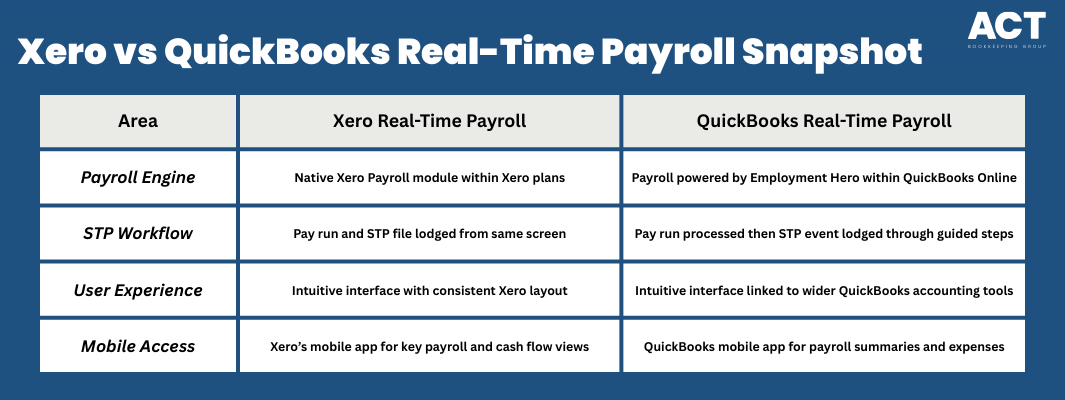
Both Xero and QuickBooks Online support real-time STP by sending payroll information when you approve each pay run. In Xero, STP is built directly into Xero Payroll, so you run payroll, review it and then lodge it as a pay event within the same workflow. QuickBooks uses QuickBooks Payroll powered by Employment Hero, so payroll processing and STP lodgement sit inside the QuickBooks accounting software but connect to a specialist payroll engine.
In practice, both Xero and QuickBooks aim to remove double handling, so you are not exporting files or uploading data separately to the ATO. This helps reduce manual data entry and keeps your bank transactions, wages and PAYG withholding aligned. For bookkeepers and accounting professionals, that tight connection between payroll and the general ledger makes it easier to track cash flow and prepare management reports.
How Does Xero Support Single Touch Payroll in Bookkeeping Software?
Xero Payroll includes STP reporting as part of the pay run workflow, so you can lodge a pay event to the ATO when each pay run is finalised. In Australia, you should be using STP Phase 2, and Xero has stopped supporting STP Phase 1. Xero’s STP report covers year-to-date earnings, PAYG withholding, and superannuation liability amounts. Plan inclusions vary by payroll headcount, so match your plan to the number of people you pay.
Xero is not a payroll intermediary, so you still pay employees from your bank, for example by using the payment file generated after the pay run. Payroll admins can’t run pay runs inside the Xero Accounting mobile app, but the app is useful for invoices, bank reconciliation, and cash-flow visibility on the go. For employee self-service, Xero Me lets staff view payslips, request leave, and enter timesheets via mobile. Use the apps for visibility, but complete payroll processing and STP lodgement in Xero via a web browser.

How Does QuickBooks Support Single Touch Payroll in Bookkeeping Software?
In Australia, QuickBooks provides STP through QuickBooks Payroll powered by Employment Hero. After you finalise a pay run, you can lodge a pay event that reports year-to-date gross payments, tax withheld, allowances, deductions, and super information to the ATO. QuickBooks recommends lodging the pay event on the day of, or before, the employee pay date. The employee app branding has shifted to Employment Hero Work, but STP functionality remains the same.
QuickBooks Payroll is sold in Standard and Advanced tiers, with an optional upgrade to QuickBooks Advanced Payroll for more automation (such as rostering and pre-built awards). Because pricing is commonly per employee paid, compare tiers based on headcount and the features you need. Payroll journals integrate back into QuickBooks Online so wages and PAYG expenses align with your accounts.
What are the Key Differences in Real-Time Payroll Capabilities?
When you look at Xero vs QuickBooks for real-time payroll, the first difference is how each tool delivers payroll inside the broader accounting software. Xero keeps payroll inside the Xero accounting software itself, while QuickBooks connects to Employment Hero as its payroll engine. This affects how the screens look and how you move between payroll tasks and general accounting features.
Another key difference is how each system structures pricing and payroll capacity. QuickBooks pricing may bundle payroll differently to Xero plans, especially if you want features like Payroll Premium or more advanced reporting. For some small businesses, it is helpful to compare the pricing comparison based on employees, advanced features and whether you will pay extra cost for add-ons or more users.
How Do Inventory and Project Features Sit Alongside Payroll?
Many Australian businesses also compare Xero vs QuickBooks based on inventory tracking, project management and reporting. If you need inventory management, both Xero and QuickBooks offer ways to track stock and cost of goods alongside payroll costs. This helps you see how wage costs relate to product profitability and overall cash flow.
For tracking projects, both Xero and QuickBooks provide project management tools that let you assign time, expenses and sometimes payroll costs to specific jobs. This can be helpful if you want to understand which projects or clients are most profitable after factoring in wages. When you can link payroll processing with project management software, you get more meaningful management reports without extra manual data entry.
How Do Mobile Apps and Integrations Support Real-Time Payroll?
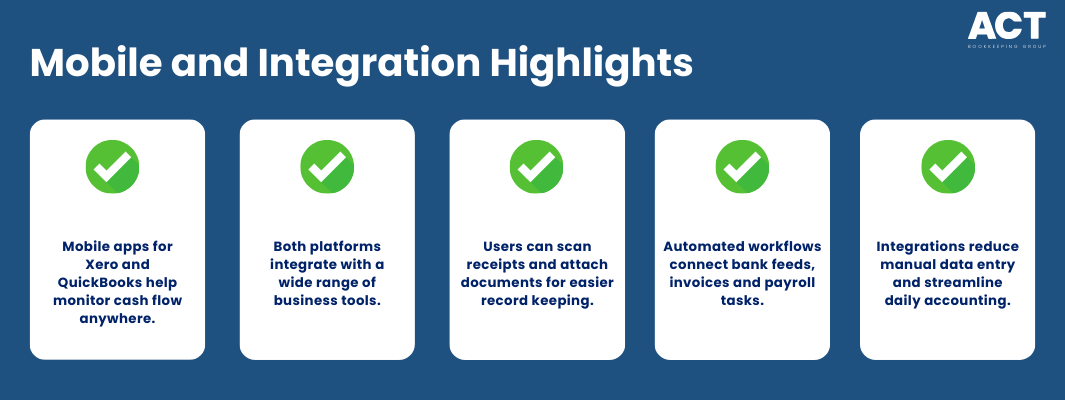
Mobile access is important when business owners and bookkeepers are often away from their desks. Both QuickBooks and Xero offer mobile app options so you can check bank account balances, send invoices and see payroll information quickly. Xero’s mobile app focuses on invoices, reconciliations and basic reporting, while the QuickBooks mobile app highlights expense tracking, scan receipts tools and high‑level payroll summaries.
Integrations also play a big role when you are comparing QuickBooks vs Xero. Xero integrates with many third‑party tools, including project management, supplier management and more advanced reporting apps. QuickBooks integrations cover similar ground and can give you more advanced features for things like expense management, automated reminders and reporting without changing your core accounting software.
How Suitable are Xero and QuickBooks for Different Types of Businesses?
For team access, Xero business plans allow unlimited users, which helps you add owners, managers, bookkeepers, and advisors without paying for extra logins. QuickBooks Online limits billable users by subscription tier (for example, 1 user in Simple Start, 3 in Essentials, 5 in Plus, and up to 25 in Advanced). Because user caps can affect cost and workflow, confirm your plan’s limits before onboarding your team. Also factor in payroll headcount pricing, since payroll inclusions can vary by plan.
For multi-currency, Xero includes it in selected AU plans (for example, Comprehensive and Ultimate). QuickBooks Online supports multi-currency on Essentials, Plus, and Advanced, but not on Simple Start, and once enabled it can’t be turned off. If you regularly invoice or bill in foreign currencies, decide early because changing later can be disruptive. Always check your exact subscription before publishing a feature comparison.
What Should You Consider when Choosing Between Xero and QuickBooks for STP?
When weighing Xero vs QuickBooks for STP, it helps to look beyond a quick Xero comparison or a single pricing table. Think about your accounting background, how comfortable you feel with payroll processing and whether you want more guidance inside the software. For some owners, working closely with accounting professionals or bookkeepers makes the choice clearer because they can see how each system will work in real life, not just on paper.
You should also consider how features like bank feeds, expense management, advanced reporting and automated reminders will support your broader goals. If you want to track cash flow closely, support multiple users, link to project management or reduce manual data entry, both Xero and QuickBooks offer strong options. The question becomes which accounting solution feels more natural for you, your team and your day‑to‑day processes.
We’re more than bookkeeping experts
As part of ACT Tax Group, we offer complete accounting and business advisory services tailored to your needs.
How Can a Professional Bookkeeper Help You Get More from Real-Time Payroll?
Working with a professional bookkeeping team can make a big difference when you are setting up real-time payroll in either Xero or QuickBooks. A bookkeeper who understands both Xero and QuickBooks can help map pay items correctly, set up bank feeds, align payroll schedules and ensure STP is lodged correctly each pay run. This can save you time and reduce the risk of errors that might affect your employees or your ATO obligations.
Ongoing, a bookkeeping partner can review your accounting processes, help you track cash flow, fine‑tune your reports and support you in choosing between Xero vs QuickBooks as your needs change. Whether you use both Xero and QuickBooks in different entities or you are looking for a QuickBooks alternative, professional support helps keep everything running smoothly. For many Australian businesses, that support is what turns advanced features into everyday tools that genuinely help manage finances.

Conclusion: What Is Your Next Step with Single Touch Payroll in Your Bookkeeping Software?
Single Touch Payroll in bookkeeping software has become a core part of running payroll for Australian businesses, and both Xero and QuickBooks now offer strong real-time solutions. When you compare Xero vs QuickBooks, think about more than just QuickBooks pricing or one or two key features; consider how each system will support payroll, bank accounts, reporting and your wider accounting processes. The right accounting software will feel natural to use, reduce manual data entry, help you track cash flow and make it easier to stay compliant without extra stress.
If you are unsure which platform is best for your situation, or you feel your current STP setup might not be working as well as it should, this is a good time to reach out for guidance. A trusted bookkeeping partner can help you review your current system, compare QuickBooks vs Xero in detail and set up the workflows and reports that match your goals. With the right accounting solution in place, you can manage payroll, send invoices, track income and keep your business moving forward with more confidence.
